Description
.tpl-section{background:#0f0f0f;border:1px solid #c9a84c;border-radius:10px;padding:28px 32px;margin:28px 0;font-family:’Segoe UI’,system-ui,sans-serif;color:#e8e8e8}
.tpl-section h3{color:#c9a84c;font-size:1.05rem;font-weight:700;letter-spacing:.08em;text-transform:uppercase;margin:0 0 18px;padding-bottom:10px;border-bottom:1px solid #2a2a2a}
.tpl-grid{display:grid;grid-template-columns:repeat(auto-fill,minmax(220px,1fr));gap:14px;margin:0;padding:0;list-style:none}
.tpl-grid li{background:#181818;border:1px solid #2a2a2a;border-radius:7px;padding:14px 16px;font-size:.9rem;line-height:1.5}
.tpl-grid li strong{display:block;color:#c9a84c;margin-bottom:4px;font-size:.82rem;text-transform:uppercase;letter-spacing:.06em}
.tpl-included{display:grid;grid-template-columns:repeat(auto-fill,minmax(190px,1fr));gap:10px;list-style:none;margin:0;padding:0}
.tpl-included li{display:flex;align-items:flex-start;gap:9px;background:#181818;border-radius:7px;padding:10px 13px;font-size:.88rem;line-height:1.45}
.tpl-included li::before{content:”✓”;color:#c9a84c;font-weight:700;flex-shrink:0;margin-top:1px}
.tpl-stack{display:flex;flex-wrap:wrap;gap:8px;margin:0;padding:0;list-style:none}
.tpl-stack li{background:#1a1a1a;border:1px solid #c9a84c33;border-radius:20px;padding:5px 14px;font-size:.8rem;color:#d4b96a;font-weight:600}
.tpl-for{display:flex;flex-wrap:wrap;gap:8px;margin:0;padding:0;list-style:none}
.tpl-for li{background:#1a1a1a;border:1px solid #3a3a3a;border-radius:6px;padding:7px 14px;font-size:.85rem;color:#ccc}
.tpl-for li::before{content:”→ “;color:#c9a84c}
Coming Soon Page HTML Template — Build Hype Before Launch Day
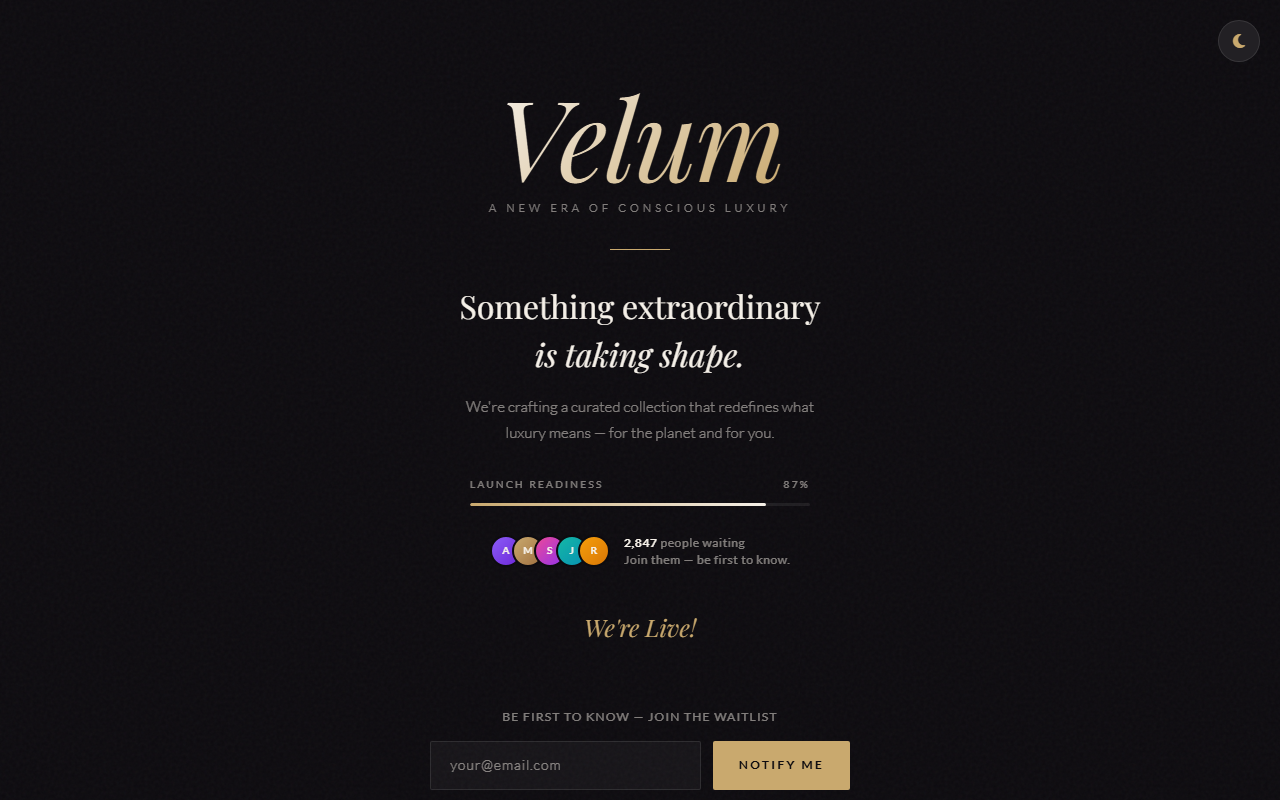
Turn your pre-launch waiting period into a marketing asset. This coming soon page template captures emails, builds anticipation, and gives your audience a polished first impression — even before your site goes live.
Feature Highlights
- Canvas Particle BGLightweight JS particle system — responsive to mouse movement. 60fps, GPU-accelerated.
- CSS Flip CountdownDays / Hours / Minutes / Seconds flip cards with 3D CSS perspective animation. One variable to set your date.
- Email Capture FormReal-time validation + Formspree/Netlify Forms integration. Zero backend code.
- Confetti BurstOn successful subscribe, confetti rains from the top — a memorable micro-interaction.
- Launch Progress BarAnimated percentage bar teasing proximity to launch milestone.
- FOMO CounterAuto-incrementing ‘Join X early subscribers’ stat to trigger social proof.
- Dark / Light TogglePersisted in localStorage — returning visitors see their preference.
- Social LinksIcon row: Twitter/X / Instagram / LinkedIn / YouTube with hover effects.
What’s Included
- index.html — complete coming-soon page (self-contained)
- style.css — CSS variables for instant color/font theming
- countdown.js — timer + particle + confetti + form logic
- /assets/ — logo placeholder, background textures
- README.md — set your launch date, connect your form endpoint
Tech Stack
- Vanilla JS (Canvas API)
- Pure CSS 3D Transforms
- Google Fonts — Space Grotesk
- Formspree-ready
- Netlify Forms-ready
- Single file deploy
Perfect For
- Founders building launch anticipation before going live
- Indie hackers collecting beta signups for a new product
- Startups running pre-launch email campaigns
- Agencies holding a domain while the real site is in development
- App developers teasing a mobile launch date
Frequently Asked Questions
How do I change the countdown date?+
Open script.js and update the targetDate variable to your launch date in YYYY-MM-DD format. The timer recalculates automatically on every page load.
Can I customize the particle animation?+
Yes. Particle count, speed, color, and size are all configurable in the particleConfig object at the top of script.js — no animation expertise required.
How do I connect the email sign-up form?+
The form posts to a configurable endpoint. Point the action attribute to Mailchimp, ConvertKit, or your own API handler.
Can I add a background video instead of particles?+
Yes. Replace the canvas element with an HTML5 video tag set to autoplay, muted, and loop, then adjust the overlay opacity in style.css.
Does it send an email when the countdown ends?+
No — the front-end timer simply reaches zero and displays a launch message. Any post-launch notification runs on your back end or via a scheduled email service.

Benjamin C. –
Very comprehensive set of components: user management table, settings forms, notification dropdown, and a solid calendar widget. One star off because the mobile breakpoint for the data table could use a horizontal scroll wrapper, but otherwise excellent.
Charlotte H. –
Best dashboard template at this price point — full stop. Data tables with sorting, the KPI cards, and the responsive grid all held up under real data. The dark sidebar + light content area is a great design choice for long sessions.
Elijah S. –
The sidebar navigation with collapsible sub-menus and active-state indicators is exactly what a production admin panel needs. The Chart.js integration for the analytics cards worked out of the box. Saved me at least a week of UI work.