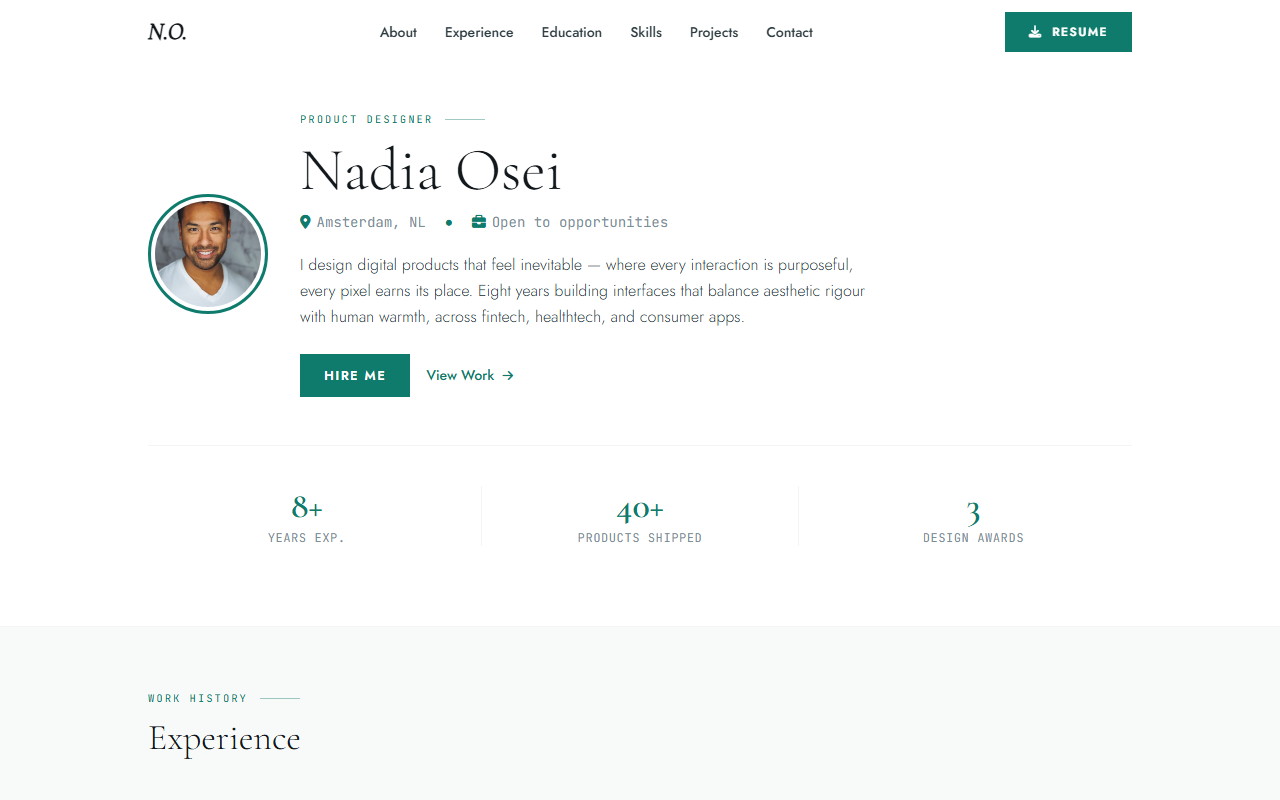
Description
.tpl-section{background:#0f0f0f;border:1px solid #c9a84c;border-radius:10px;padding:28px 32px;margin:28px 0;font-family:’Segoe UI’,system-ui,sans-serif;color:#e8e8e8}
.tpl-section h3{color:#c9a84c;font-size:1.05rem;font-weight:700;letter-spacing:.08em;text-transform:uppercase;margin:0 0 18px;padding-bottom:10px;border-bottom:1px solid #2a2a2a}
.tpl-grid{display:grid;grid-template-columns:repeat(auto-fill,minmax(220px,1fr));gap:14px;margin:0;padding:0;list-style:none}
.tpl-grid li{background:#181818;border:1px solid #2a2a2a;border-radius:7px;padding:14px 16px;font-size:.9rem;line-height:1.5}
.tpl-grid li strong{display:block;color:#c9a84c;margin-bottom:4px;font-size:.82rem;text-transform:uppercase;letter-spacing:.06em}
.tpl-included{display:grid;grid-template-columns:repeat(auto-fill,minmax(190px,1fr));gap:10px;list-style:none;margin:0;padding:0}
.tpl-included li{display:flex;align-items:flex-start;gap:9px;background:#181818;border-radius:7px;padding:10px 13px;font-size:.88rem;line-height:1.45}
.tpl-included li::before{content:”✓”;color:#c9a84c;font-weight:700;flex-shrink:0;margin-top:1px}
.tpl-stack{display:flex;flex-wrap:wrap;gap:8px;margin:0;padding:0;list-style:none}
.tpl-stack li{background:#1a1a1a;border:1px solid #c9a84c33;border-radius:20px;padding:5px 14px;font-size:.8rem;color:#d4b96a;font-weight:600}
.tpl-for{display:flex;flex-wrap:wrap;gap:8px;margin:0;padding:0;list-style:none}
.tpl-for li{background:#1a1a1a;border:1px solid #3a3a3a;border-radius:6px;padding:7px 14px;font-size:.85rem;color:#ccc}
.tpl-for li::before{content:”→ “;color:#c9a84c}
Resume & CV Website HTML Template — Your Personal Brand, Perfected
Stand out in a crowded job market with a personal resume website that recruiters actually remember. This template goes far beyond a plain PDF — it’s an interactive portfolio that showcases your skills, experience, and projects in one polished page.
Feature Highlights
- Animated Skill BarsScroll-triggered progress bars per skill — width and percentage fully configurable per line of HTML.
- Experience TimelineAlternating vertical timeline — company logo, role, date range, bullet-point responsibilities. Mobile-collapsible.
- Project Portfolio3-column masonry grid with screenshot, tech badges, live demo, and GitHub link.
- PDF Download CTASticky floating card on desktop, inline CTA on mobile — prompts recruiters to grab your traditional CV.
- Typewriter HeroName cycles through roles with blinking cursor. Immediate recruiter-grabbing impact.
- Certificates SectionCard-based layout for degrees and certs with institution logo, year, and credential URL.
- Contact Form3-field form with validation — Formspree-ready, no backend required.
- Print CSSCtrl+P outputs a clean one-page resume layout — fonts and margins auto-adjusted for print.
What’s Included
- index.html — full resume / portfolio page
- style.css — main stylesheet + embedded print media query
- resume.js — typewriter, skill bar animation, dark mode toggle
- resume.pdf — placeholder CV PDF to link from the download CTA
- /assets/ — demo profile photo, company logos, project screenshots
- README.md — step-by-step guide to fill in your own content
Tech Stack
- Pure HTML5 + CSS3
- Vanilla JS
- Google Fonts — Inter
- Font Awesome 6
- Intersection Observer
- Print CSS included
Perfect For
- Developers and designers landing their next role
- Recent graduates making a standout first impression
- Freelancers converting portfolio visits into project inquiries
- Senior professionals replacing a boring PDF with an interactive CV
- Job seekers in competitive markets who need to stand out
Frequently Asked Questions
Can I export it to PDF?+
Yes. Open the page in Chrome, press Ctrl+P, choose Save as PDF, and select the included print stylesheet for a clean single-column layout.
How do I add more skills to the bar chart?+
Each skill is a self-contained HTML element with a data-level attribute that controls the bar width. Duplicate the element and update the label and percentage.
Can I password-protect the page?+
Not at the HTML level alone. Password protection requires a server-side solution — Netlify basic auth, an .htaccess rule on Apache, or a serverless function gating the route.
Is the timeline section expandable?+
Yes. Each timeline entry is independently editable. Add new roles by duplicating the entry block and updating the date, title, company, and description text.
Does it include a dark mode?+
Yes. A dark/light toggle is included and respects the OS prefers-color-scheme preference as default, with a manual override button.

Theodore Z. –
Ran a live event with 400 attendees and this page held up beautifully under traffic. The ticket CTA section with early-bird pricing toggle drove urgency effectively. Outstanding template.
Penelope Y. –
Lovely design with a strong visual identity that adapts well to different event brands. The multi-track schedule grid handles parallel sessions cleanly. I would love a past-event archive template as an add-on, but this core template is excellent value.
Henry O. –
Everything an event page needs: ticket tiers, sponsor logos, venue map embed, and FAQ section. The animated agenda tabs are a particularly nice touch. Setup took under three hours. Five stars.
Scarlett W. –
The countdown timer above the hero is a superb conversion driver and was trivially easy to configure. Speaker cards with social links and the schedule accordion work exactly as expected. Used this for a tech conference and got great feedback.